SSC CHSL Tier-II 2025: Official Answer Key Out & Next Easy Steps
My dear aspirant, welcome to the next crucial stage of your SSC recruitment journey.
Welcome back to Sathya jobalerts.com ,here to help you navigate this critical phase. If you recently appeared for the SSC CHSL Tier-II 2025 exam on the 10th of April, you already know the intense competition and pressure of these exams. Now, for the candidates who gave their absolute best in the examination hall, the most highly anticipated moment has arrived—the Tier-II Answer Key release.
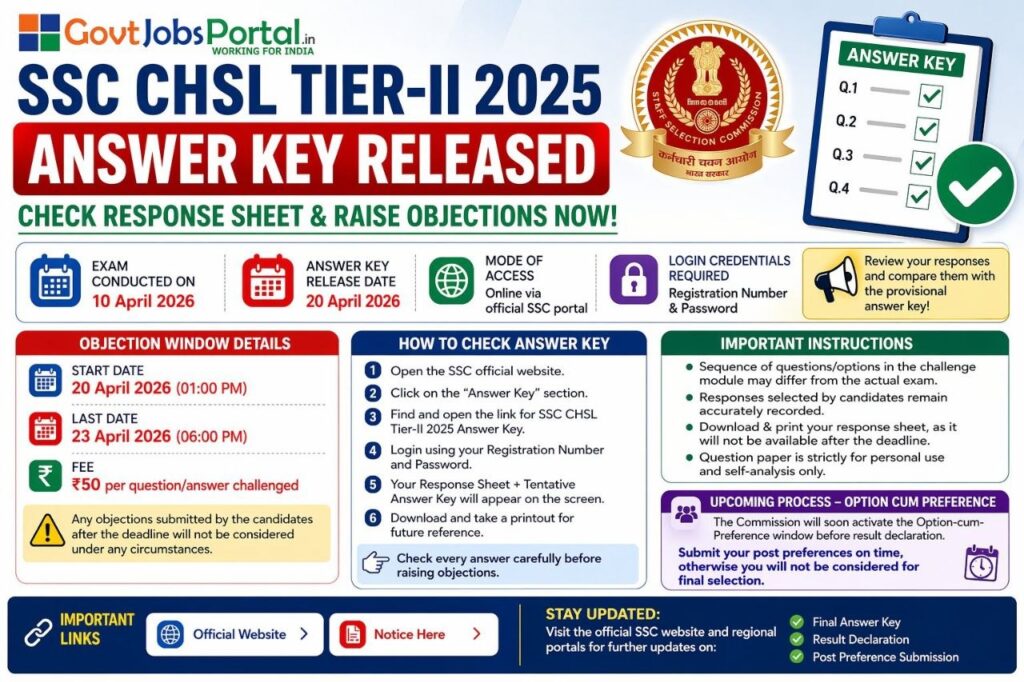
The Staff Selection Commission (SSC) has officially released an Important Notice regarding the Tier-II Answer Key for the Combined Higher Secondary (10+2) Level Examination 2025. Candidates who appeared for the second stage can now evaluate their performance.
The post-exam phase is quite unique, as it gives you a transparent view of your performance and a strict, limited window to raise objections. To help you evaluate your standing, I have compiled all the official notification details directly from the latest release below, along with my own special post-exam strategy on how to calculate your scores accurately and prepare for the all-important Option-cum-Preference stage. Let’s break down the details.
The Commission aims to maintain absolute transparency in filling these critical posts. Eligible candidates can download their Response Sheets and Tentative Answer Keys strictly through online mode via the official SSC portal. Below, you will find everything you need to know about the SSC CHSL Tier-II next steps, objection dates, and download instructions.
1. SSC CHSL Tier-II 2025: Quick Overview
| Particulars | Details |
| Board Name | Staff Selection Commission (SSC) |
| Exam Name | SSC CHSL Tier-II 2025 Examination |
| Current Status | Provisional Answer Key Released |
| Exam Date | 10 April 2026 |
| Job Location | All Over India |
| Download Mode | Strictly Online |
| Official Website | ssc.gov.in |
2. Provisional Answer Key Vs. Final Answer Key: What is the Difference?
Many candidates confuse these two important updates from SSC. Here is exactly how they differ:
- Provisional Answer Key: Released shortly after the exam. This document shows the official tentative answers alongside the options you selected. It allows you to calculate your raw score and, most importantly, raise objections if you find any official answer to be incorrect.
- Final Answer Key: Released after the board reviews all candidate objections. The SSC expert panel corrects any valid mistakes from the provisional key. This is the ultimate document, and the final results are strictly based on this.
3. Important Dates You Must Remember
| Events | Dates |
| Exam Date (Tier-II) | 10 April 2026 |
| Answer Key Release Date | 20 April 2026 |
| Objection Window Starts | 20 April 2026 (01:00 PM) |
| Last Date to Raise Objections | 23 April 2026 (06:00 PM) |
4. Requirements for Raising Objections
Ensure you meet the Commission’s specific requirements before submitting any challenges against the official answers.
| Criteria | Requirements |
| Timeframe | Objections must be raised strictly before the closing window on 23 April 2026 at 06:00 PM. Anything submitted after the deadline will not be considered under any circumstances. |
| Objection Fee | ₹50/- per question/answer challenged. |
| Valid Proof | You must provide authentic reference material to back up your claim. |
5. Complete Selection Process: Step-by-Step
- Step 1: Tier-I (Computer Based Examination) – Already completed.
- Step 2: Tier-II (Computer Based Examination) – The current stage. The answer key is now live for self-analysis.
- Step 3: Option-Cum-Preference Submission – Crucial Upcoming Process! The Commission will soon activate this window before result declaration. You must submit your post preferences on time, otherwise you will not be considered for final selection.
- Step 4: Final Result & Document Verification – Conducted by the respective allocated departments.
6. Marking Scheme for SSC CHSL Tier-II
Get ready to calculate your exact score! Here is a brief look at the standard Tier-II marking rules:
- Correct Answer: +3 Marks
- Negative Marking: -1 Mark for every wrong answer in Section-I, Section-II, and Module-I of Section-III.
- Unattempted Questions: 0 Marks.
🔥 Sathi’s Special Post-Exam Strategy for SSC Candidates
The exam is done, but our preparation journey continues. As your study partner, here is my strategic breakdown of what we need to do next:
- Calculate Calmly: Do not ignore the negative marking! Be totally honest with your calculations. Count your exact correct and incorrect attempts to get your true raw score. Print your response sheet immediately, as it will not be available after the deadline.
- Challenge with Proof: If you are 100% sure an SSC answer is wrong, do not hesitate to raise an objection. Paying the ₹50 fee could secure you the marks that make or break your final merit ranking.
- Prepare for Option-Cum-Preference: This is the most critical warning on the notification. Start researching the different departments (LDC, JSA, DEO) right now so you are ready to fill out your preferences the moment the window opens.
- Pivot to Upcoming Exams: Do not waste time just waiting for the result. Keep your speed sharp and apply your momentum to upcoming SSC CGL or MTS notifications. Let’s write a mock test together tomorrow.
7. Required Details for Login
Candidates must have the following details ready to access their response sheets on the portal:
- Registration Number
- Password
8. Details Mentioned on Your Response Sheet
Check the following details carefully on your downloaded document:
- Candidate’s Full Name, Registration Number, and Roll Number
- Your specific Exam Date and Shift timing
- The exact question ID and the four options
- Your Chosen Option
- The Official Correct Option (usually marked with a green check ✅)
9. Step-by-Step Guide: How to Download Answer Key & Raise Objections Online?
Follow these exact steps to successfully download your documents and submit challenges:
- Step 1: Open the SSC Official Website. Go to the official SSC portal.
- Step 2: Click on the “Answer Key” Section.
- Step 3: Find the Link. Look for and open the link for “SSC CHSL Tier-II 2025 Answer Key”.
- Step 4: Login. Enter your Registration Number and Password.
- Step 5: View & Download. Your Response Sheet + Tentative Answer Key will appear on the screen. Download and take a printout for future reference immediately.
- Step 6: Raise Objections (If Any). Check every answer carefully. If you find an error, follow the prompt to submit your challenge and pay the ₹50 fee per question before 23 April, 06:00 PM.
10. Important Links
| Important Links | Click Here |
| Official SSC Portal | ssc.gov.in |
| Join Telegram | Click here to join |
11. Common Mistakes to Avoid While Checking the Answer Key
- Forgetting to Download the Sheet: The response sheet is strictly for personal use and self-analysis, but the link will disappear after 23 April. Download it now.
- Missing the Deadline: The objection link is only active until 23 April 2026 (06:00 PM). Do not wait for the last minute; server crashes are common.
- Ignoring the Option-Cum-Preference Warning: Failing to submit your post preferences in the upcoming window means you will be disqualified from the final selection, regardless of your score.
12. Frequently Asked Questions (FAQs)
Q1. When is the last date to check the SSC CHSL Tier-II 2025 Answer Key?
Answer: You can check your response sheet and raise objections only until 23 April 2026 (06:00 PM).
Q2. How much is the fee to challenge a question?
Answer: The Commission charges a fee of ₹50 for every question or answer challenged.
Q3. What happens if I miss submitting my post preference later?
Answer: As explicitly stated in the official notice, if you do not submit your Option-cum-Preference on time, you will not be considered for final selection under any circumstances.
Q4. Can I access my response sheet after the objection window closes?
Answer: No. The Commission clearly states that candidates must download and print their response sheets before the deadline, as they will not be available afterward.
